A product photo needs a different finish. A rough sketch needs convincing light and materials. A film idea needs a sequence of shots. Each task starts with a different creative decision.
These six GPT Image 2.5 real use cases show how to approach photo editing, commercial design, visual storytelling, and artistic transformations.
Use the short prompts as starting points, then adjust them to your own references and goals.
TL;DR: GPT Image 2.5 Workflows
GPT Image 2.5 supports six creative workflows: precise product edits, sketch-based art, promotional posters, film storyboards, animation frames, and visual stylization.
Match your input to the task. Use photos to guide recognizable details, sketches to establish composition, and clear action descriptions to organize sequences.
Make prompts specific and check the result. Describe visible changes, assign references clear roles, and review product details, text accuracy, and character continuity.
Animation requires a separate finishing step. Generate and correct the still frames before using animation or interpolation tools to create motion.
Precision Image Editing for Product Displays
Change the detail. Preserve the product.
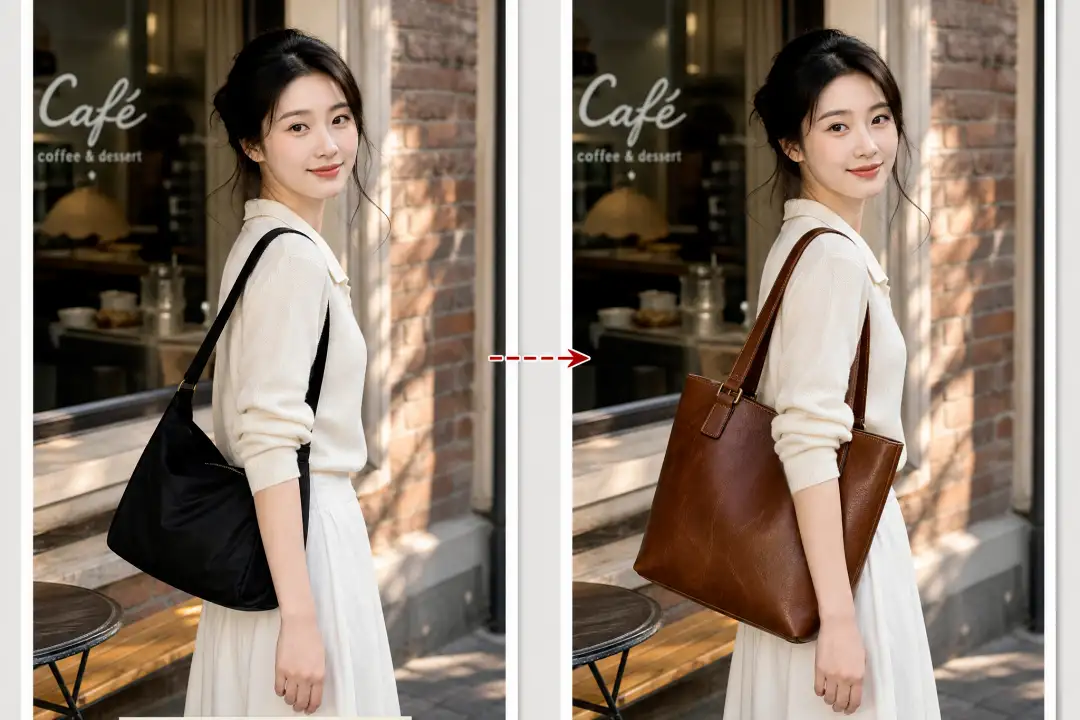
For AI product photo editing, a clear source image gives you something concrete to refine.
A bag can keep its shape and camera angle while you explore brown leather, darker stitching, or matte brass hardware.
Describe the requested change alongside the features that define the product. This helps turn a broad redesign request into a focused edit. The same approach works for cleaning a distracting background or preparing an alternate presentation.
Prompt Example :
Change the bag to brown leather with matte brass hardware. Preserve its shape, seams, logo, camera angle, background, and lighting. Add no new objects.
💡 Quick tip: Name the part and finish: “Change the clasp to brushed brass.”
❕ Avoid this mistake: A convincing image can still misrepresent the item. Zoom in on labels, seams, and proportions, and make sure the final visual matches the product you actually offer.
Sketch-to-Image Creation for Art and Concepts
Turn rough shapes into a clear visual idea.
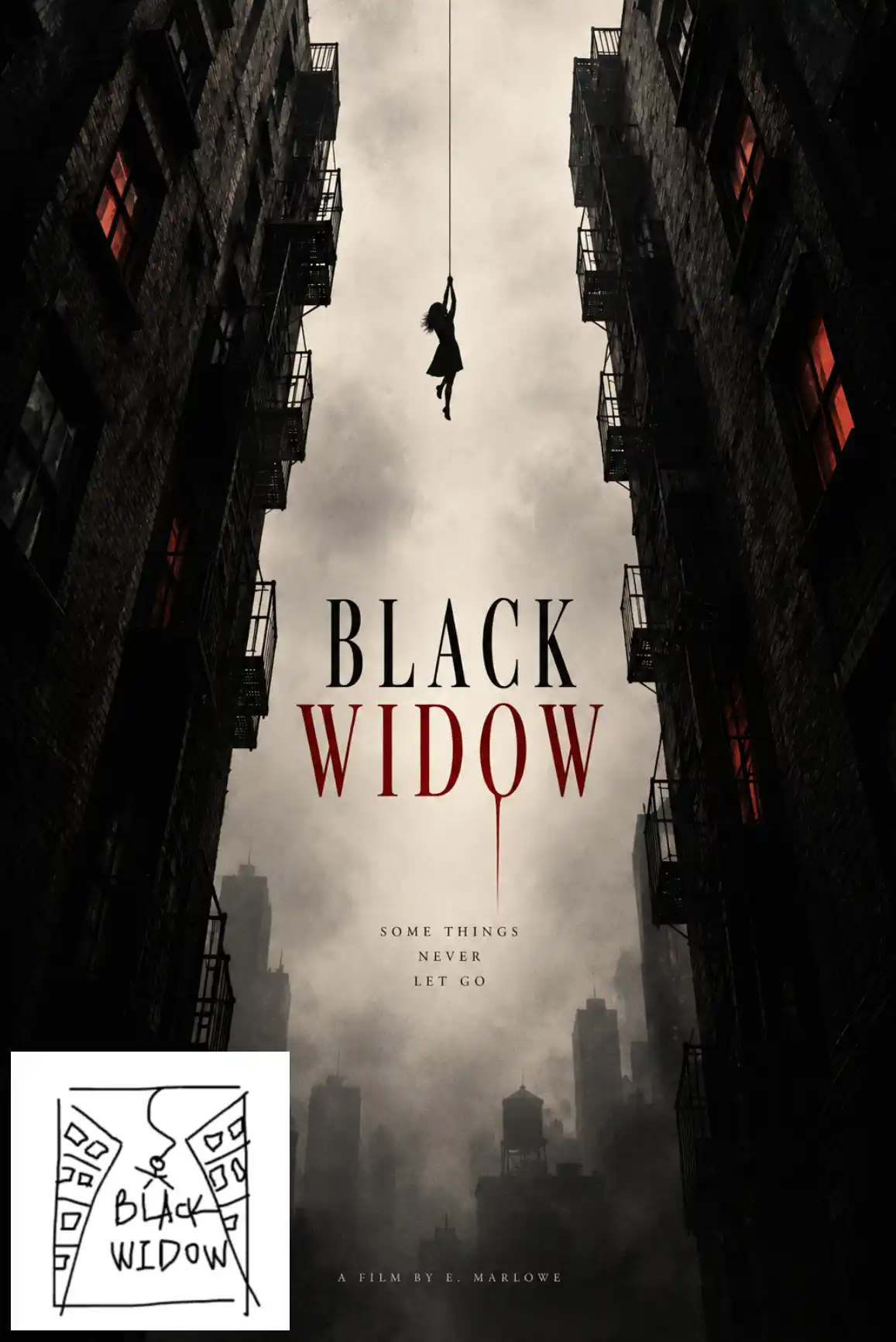
A sketch can communicate size, position, and balance faster than a paragraph. Two leaning buildings and a small suspended figure establish a dramatic composition.
The creative opportunity is in how those shapes become a scene: buildings gain surfaces, a bowl gains ceramic texture, and light gives objects depth. Use sketch-to-image AI to explore those choices while retaining the arrangement that matters to you.
Prompt Example :
Turn this sketch into a psychological thriller poster image. Preserve the leaning buildings and suspended figure. Add muted colors, mist, and realistic architectural textures. Leave the image without text.
💡 Quick tip: Draw the main shapes clearly, then add one sentence about materials or lighting.
❕ Avoid this mistake: Styling an incorrect composition makes it harder to judge. Fix misplaced objects before requesting another artistic treatment.
Poster Design for Advertising and Promotions
Start with a format, then make it fit your campaign.
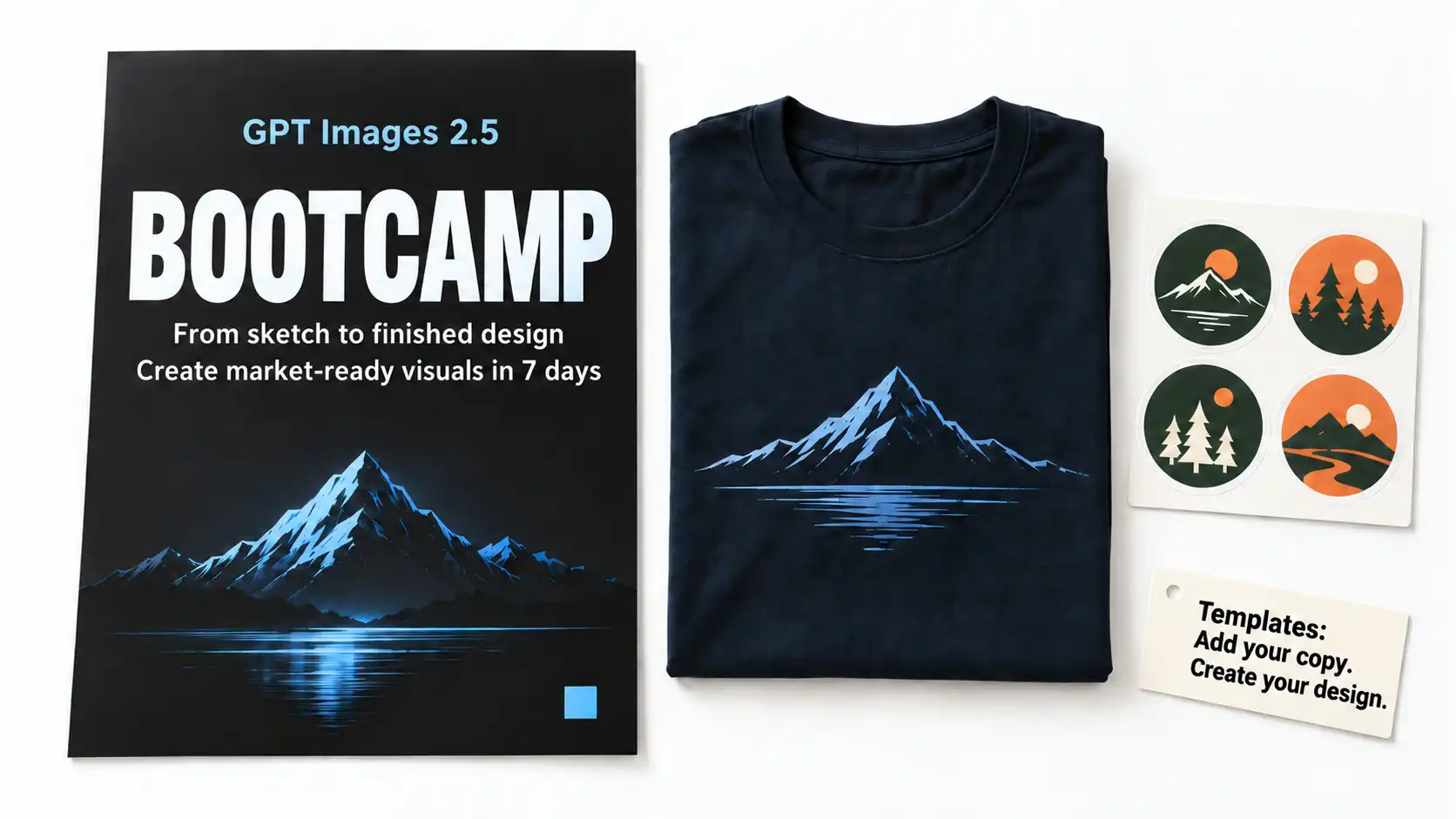
Templates give you a starting structure for AI poster design, helping you move from an idea to a promotional visual without inventing every instruction from scratch. The template workflow described in the source material starts with a format, such as a poster, and builds on it with your message, style, and layout preferences.
Build Your Promotion Around a Template
Choose a format that fits your goal, then provide the headline, essential information, colors, and desired visual. For an event announcement or service promotion, make the main message easy to spot and keep supporting details brief.
Prompt Example :
Create a 3:4 portrait enrollment poster for a hands-on AI tools bootcamp.
Title: “GPT Image 2.5 Bootcamp”
Subtitle: “From sketch to finished design—create market-ready visuals in 7 days”Style: Minimalist, high-contrast cyber blue on a dark background. Use an oversized headline that remains clearly readable at thumbnail size.
Leave space in the bottom-right corner for a logo.
Do not add flashy stickers, unnecessary decorative lines, or any text beyond the supplied title and subtitle.
Create Variations from the Same Design
Once the layout works, use it as the reference for related promotional graphics. Change the headline, image, or campaign details while asking to retain the same typography, colors, and overall structure. This gives a series of AI marketing graphics a recognizable visual identity.
💡 Quick tip: Start with one approved design, then request each variation with only the changes it needs.
❕ Avoid this mistake: A template does not guarantee accurate copy or identical layouts across outputs. Check spelling, alignment, and spacing in every version, especially when replacing short text with longer wording.
Film Preproduction: Multiple Angles and Storyboards
Plan the scene before production begins.
Explore the Scene from Different Angles
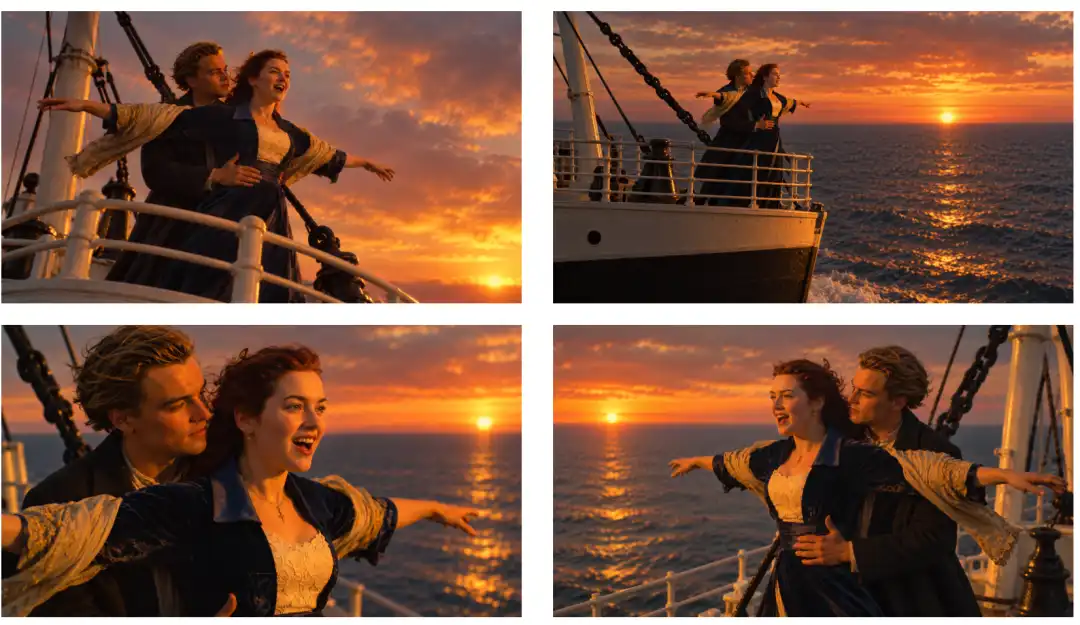
For AI film preproduction, generating several views helps you evaluate how a scene could be covered. A close-up emphasizes expression; a wide shot establishes the relationship between people and their surroundings.
The ship-bow example illustrates this approach: clothing, hairstyle, and sunset light serve as continuity cues as the camera position changes. Treat that as a way to explore shots, with each result checked against the reference.
Build a Storyboard with Clear Visual Beats
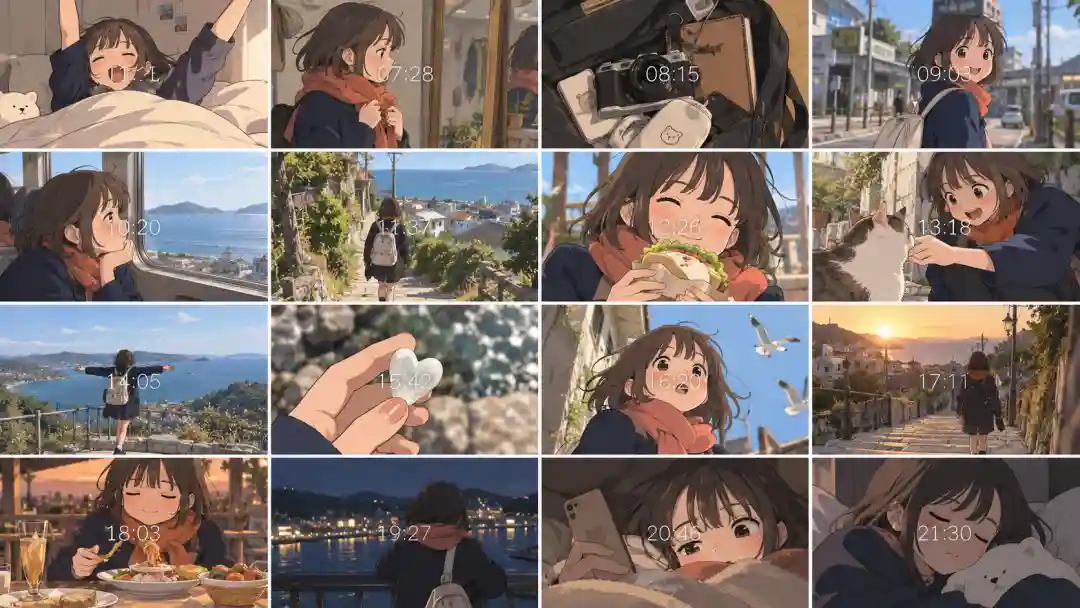
A storyboard adds progression. The day-in-the-life example moves through getting ready, traveling, eating, and spending time by the sea, with detail shots between larger actions.
Use an AI storyboard to decide what the audience needs to see and in what order. The frames can guide a shoot or provide visual references for a later video workflow.
Prompt Example :
Create a 16-panel storyboard using the person in the reference. Show her packing a bag, boarding a train, walking beside the sea, and returning home. Keep her hairstyle, scarf, and coat consistent. Use one clear action per panel.
💡 Quick tip: Give each shot one action and a camera distance, such as “wide shot” or “close-up.”
❕ Avoid this mistake: Similar-looking characters do not guarantee scene continuity. Check screen direction, prop placement, and surroundings; replace the shot that breaks the sequence.
Animation Planning: Sequence Frames and In-Betweening
Build the action one clear pose at a time.
Generate the Key Poses
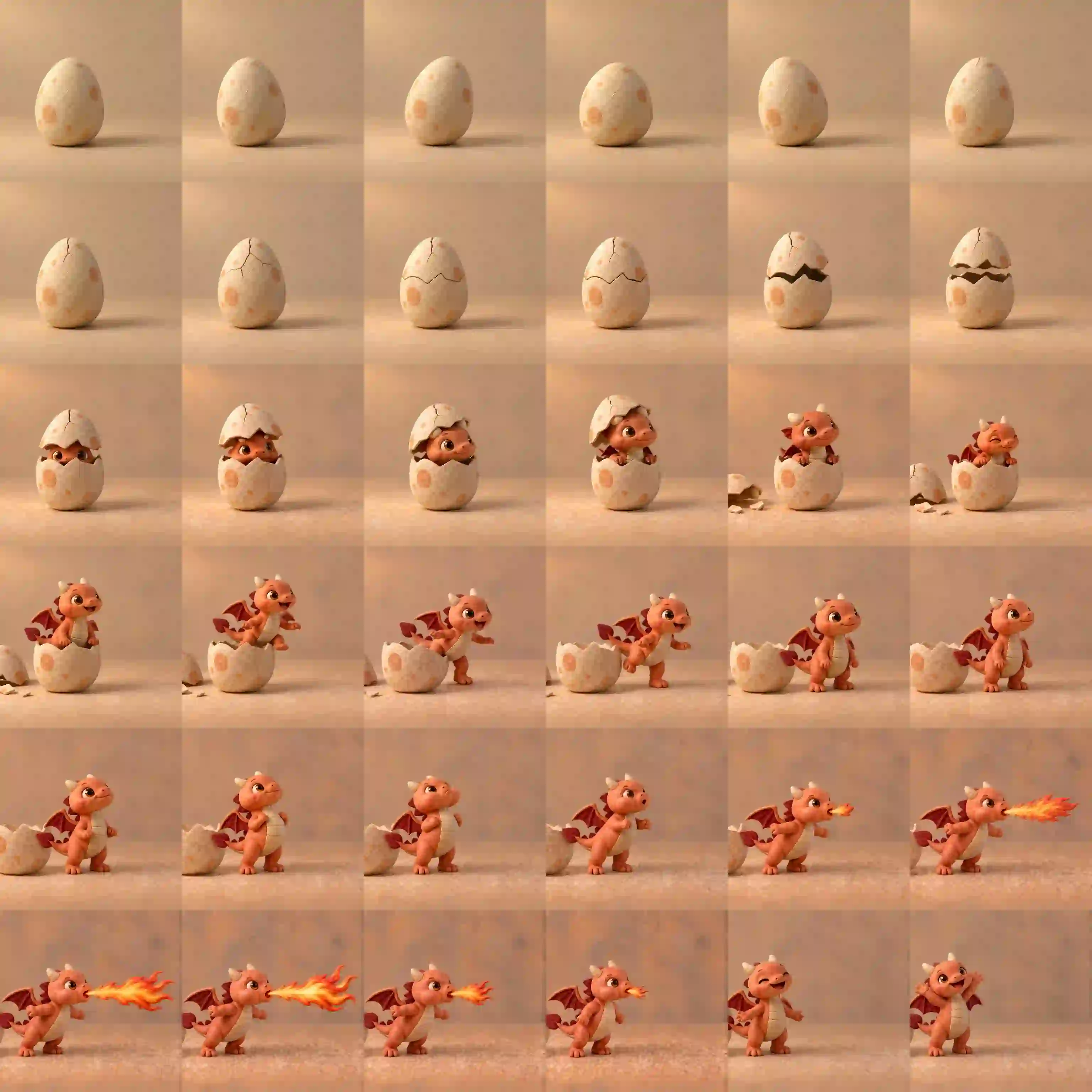
AI animation frames can help explore a short movement before animation work begins. A sprite sheet places poses together so you can compare proportions and see whether the action progresses clearly.
Start with a simple movement and specify its beginning, transition, and ending. Keep the viewpoint and character scale stable so changes in pose are easier to evaluate.
Prompt Example :
Create a clay-style stop-motion animation of a baby fire dragon hatching from an egg, climbing out, and breathing fire. Plan and generate 36 sequential frames with consistent character design, lighting, background, and camera angle. Combine them into a 6 fps animation.
Prepare the Sequence for Interpolation
Separate the frames, align them, and correct unwanted changes. Then use an animation or frame-interpolation tool to build transitions and preview the timing. GPT Image 2.5 generates the still-image material; interpolation is a separate step.
💡 Quick tip: Start with a short action and a few readable poses.
❕ Avoid this mistake: More frames will not repair an unclear movement. Fix shifting proportions, repeated poses, or sudden position changes before interpolation, then check the animation for warping.
Creative Stylization: From Art Prints to Game Aesthetics
Give a familiar scene a new visual language.
AI image style transfer can change how a scene is expressed while keeping its subject recognizable.
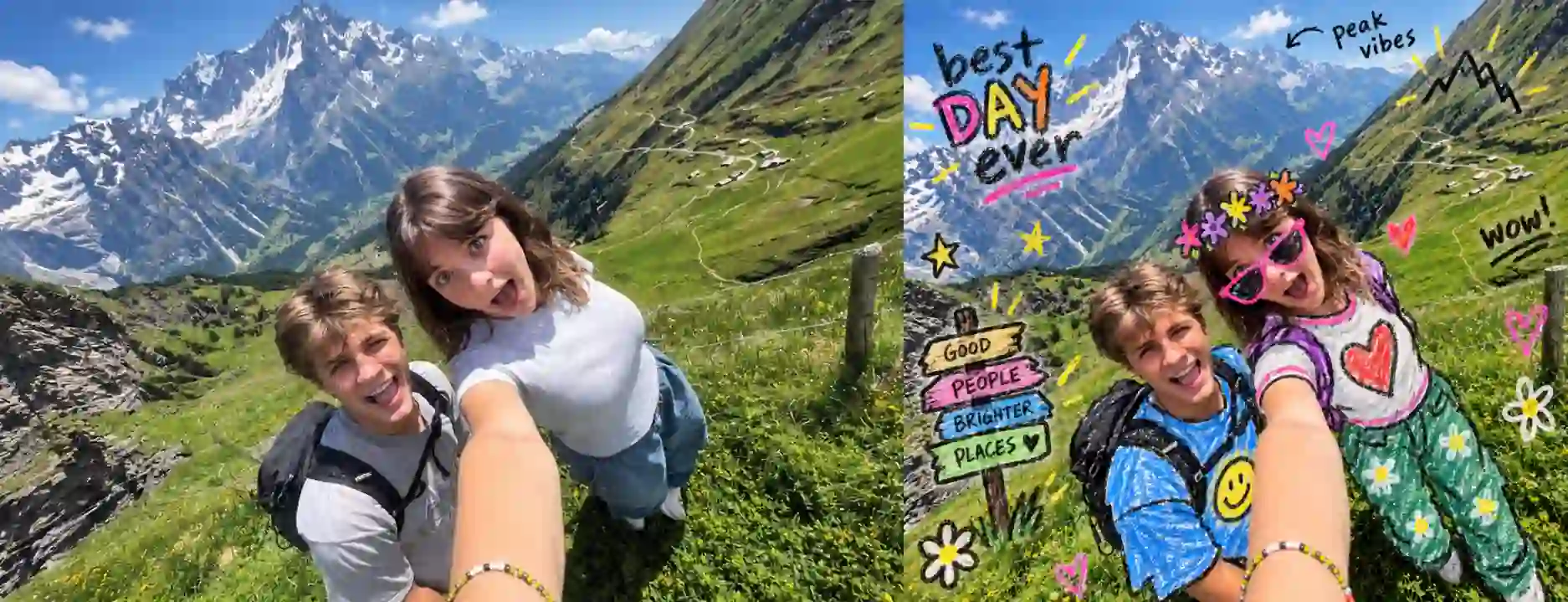
A travel photo can combine realistic faces with crayon doodles, or pair a photographic scene with a watercolor interpretation. For a mixed-media variation, specify the boundary: retain realistic people and scenery, but add rough crayon marks to clothing and selected props.
Prompt Example :
Add playful crayon-and-marker doodles over the original photo, like a hand-decorated snapshot. Choose 2–4 additions suited to the scene: colorful clothing overlays, doodled accessories, funny props, simple symbols, or short handwritten notes. Use rough black outlines, uneven strokes, bright flat colors, and waxy crayon textures. Follow the subjects’ shapes, poses, and perspective. Keep faces, skin, hair, hands, and surroundings photorealistic, with the underlying photo otherwise unchanged. Give each image a spontaneous, quirky photo-diary feel without cartoonizing the whole scene.
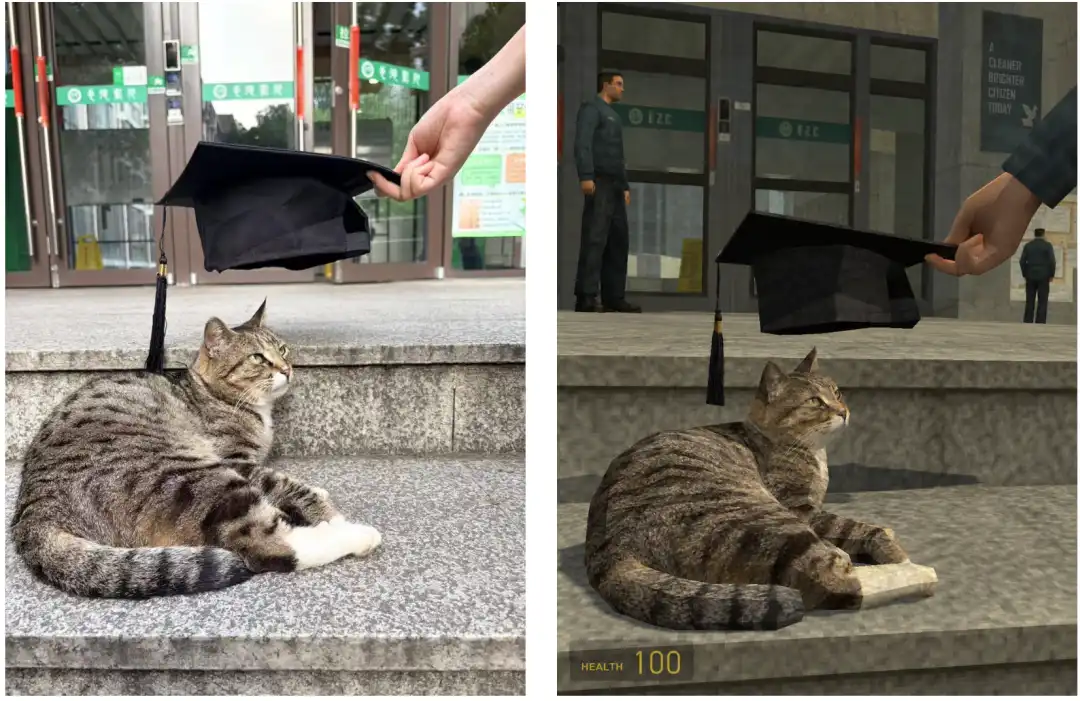
For a retro game aesthetic, describe changes to geometry, textures, and lighting. Angular shapes and simple surface textures communicate a different result from adding a color filter alone. The output remains a two-dimensional image.
Prompt Example :
Recreate this photo as a 3D game screenshot in the style of the early Source engine, resembling Half-Life 2 or an early Garry’s Mod map. Preserve the original subject, composition, camera angle, and scene layout, while reinterpreting the entire scene with period-appropriate geometry, textures, and lighting. Make it look as though the real scene has been rebuilt inside an old game engine, rather than simply applying a filter.
💡 Quick tip: Choose a main style and say whether it applies to the whole image or selected areas.
❕ Avoid this mistake: If the entire photo becomes an illustration, name the areas that should retain photographic texture in the next edit.
GPT Image 2.5 Prompt Tips: Fix Common Problems
Describe the fix in terms the image can show.
Why do hands look worse after repeated edits?
Repeated tiny corrections can produce an increasingly awkward result. If that happens, return to a cleaner version and describe a coherent hand pose instead of continuing to adjust individual joints.
✅ Try: Show the hand resting flat on the table, with naturally separated fingers.
How do I turn “make it better” into a useful prompt?
Replace a judgment such as “more premium” with visible choices: a material, color, light source, or surface finish.
✅ Try: Use a matte charcoal wall and soft warm light from the upper left.
Why are details from different references getting mixed up?
Assign each reference a role so the model knows what to borrow from it.
✅ Try: Use the portrait for the person’s appearance and the room photo for the setting.
Why is the subject in the wrong position?
Replace “over there” or “a little closer” with a clear relationship in the frame.
✅ Try: Place the chair in the lower-left foreground, facing the window.
What should I write instead of a long list of “don’ts”?
Describe the desired replacement, then add only the exclusions that matter.
✅ Try: Use an empty pale-gray background with a soft contact shadow.
Turn Your Idea into Next Visual
Start small, review the result, and build from there.
Choose one task: refine a product photo, develop a sketch, or plan a short sequence.
Start with a clear reference and a specific goal, then use the result to decide your next change.
GPT Image 2.5 Use Cases FAQs
What makes a good reference image for GPT Image 2.5?
Choose a sharp image with a clearly visible subject and minimal obstruction. Details hidden by blur, cropping, or heavy shadow give the model less useful information to work with.
Can I edit an image that already contains text?
Yes. Identify the exact words to replace and provide the new copy in quotation marks. Ask to preserve the surrounding design, then check that nearby text has not changed.
Can I turn a horizontal image into a vertical design?
Request an expanded composition and explain what should fill the additional space. For example: “Extend the sky above and the pavement below, keeping the person at the same proportions.”
How do I remove an object without leaving an awkward empty patch?
Describe what should replace it. For example: “Remove the chair and continue the wooden floor and wall behind it, matching the existing perspective and lighting.”